This week I learned about multimedia. I have never formally learned about this topic before so I learned about a lot of new stuff. I learned about lossy and non lossy. I have heard the term before but was not sure what it meant. Lossy is when you compress data and information is lost to save space. Non lossy is when you compress data and information very little data is lost. However the data is rearranged so that instead of BBBBB for 5 black pixels you would have 5B. This process saves space.
I also learned what a key frame is. It is the first frame in a series of video frames that contains the majority of the information. The frames after it contains less information and are based on what changed between that and the key or first frame. AVI is the main video format for non compression. WMV which was created by Microsoft has the ability to use DRM or Digital Rights Management. DRM has the ability to check which person first owned the file. DRM can also contains a watermark and even make the file expire after a set period of time.
The main professional video editing software for the PC would be Adobe Premiere and for the Mac would be Apple Final Cut. Screen casting is when you capture what is happening on the screen of a computer and turn it into a video. Some of the best software for screen casting is Camtasia and Jing. The later is a free web application. When doing a screen cast you can choose to capture the full screen, a region (which is a user choosen area of the screen) or a window.
Overall this was an interesting week. Glad the Excel project is over :) Next week here I come!
Sunday, October 3, 2010

Excel Project
I am glad that the Excel project is over! It has been a while since I used Excel and this project was certainly a refresher.
Before starting this project I had never "frozen panes" before. So I am glad that I learned how to do that now. I also learned a lot regarding the formulas. I thought that part of the project was going to be the hardest but it actually was pretty easy. I also got a lot of confident in general regarding using the tables faster.
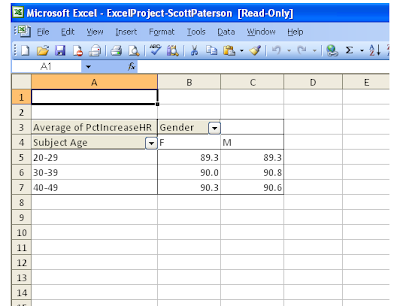
The biggest problem that I had was by far the pivot tables. I hope that I did them right! I also got the hang of using keyboard shortcuts to move around Excel. I did not remember all of them from the lecture last week but enough to still move around fairly fast.
Another problem for me was the printer section. My laptop (which is where I did the majority of the project) does not have a printer therefore I needed to go to the computer lab on campus to do this part. This got confussing however when I changed versions (Excel 10 to 03) and attempted to edit and work on my pivot tables. Since the GUI is not the same. Hopefully everything worked out.
Overall I am happy about this assignment since I feel Excel is a very powerful and useful program.
Screen shot from “AvgIncrease” pivot table.
Before starting this project I had never "frozen panes" before. So I am glad that I learned how to do that now. I also learned a lot regarding the formulas. I thought that part of the project was going to be the hardest but it actually was pretty easy. I also got a lot of confident in general regarding using the tables faster.
The biggest problem that I had was by far the pivot tables. I hope that I did them right! I also got the hang of using keyboard shortcuts to move around Excel. I did not remember all of them from the lecture last week but enough to still move around fairly fast.
Another problem for me was the printer section. My laptop (which is where I did the majority of the project) does not have a printer therefore I needed to go to the computer lab on campus to do this part. This got confussing however when I changed versions (Excel 10 to 03) and attempted to edit and work on my pivot tables. Since the GUI is not the same. Hopefully everything worked out.
Overall I am happy about this assignment since I feel Excel is a very powerful and useful program.
Screen shot from “AvgIncrease” pivot table.

Sunday, September 26, 2010
Week 5: Clear
So this week we learned about Excel. Whooo party! But actually it was pretty interesting. It has been a while since I have used Excel and it was nice to get to use it again and learn all the short cut keys and functions. Everything in this lecture I understood clearly except the Pivot Tables (Very Muddy to me!). I would like to spend a lot more time on those. Right now I am just using OpenOffice which makes it hard to follow along using the Pivot Tables. But I would really like to try working on it in actual Excel on one of the campus labs computers soon.
Before the lecture on data basics I had no idea that Excel used serial numbers which from start January 1st, 1900. It is very similar however to Unix Epoch (January 1st, 1970) which is what most computer programs use as a time starting point.
I really enjoyed the keyboard navigation tips. Such as CTRL + Home to jump back to the first column / row cell. You can also use the arrow keys to jump around easily too. I had completely forgotten about relative and absolute addressing. For absolute addressing you have to put a number sign ($) before the column number and letter. This will always use the information from that cell and not jump to using relative addressing.
I also enjoyed in the lecture how easy it is to use the Excel help index to find the names of functions. I had no idea what any of them were before watching. Some common functions are average, sum, min and max. I really like that you can use IF conditional statements which are used in programming. If I remember correctly the syntax for Excel IF statement is "cell number, condition, if true action, if false action"
Well that's it for week 5 :)
Before the lecture on data basics I had no idea that Excel used serial numbers which from start January 1st, 1900. It is very similar however to Unix Epoch (January 1st, 1970) which is what most computer programs use as a time starting point.
I really enjoyed the keyboard navigation tips. Such as CTRL + Home to jump back to the first column / row cell. You can also use the arrow keys to jump around easily too. I had completely forgotten about relative and absolute addressing. For absolute addressing you have to put a number sign ($) before the column number and letter. This will always use the information from that cell and not jump to using relative addressing.
I also enjoyed in the lecture how easy it is to use the Excel help index to find the names of functions. I had no idea what any of them were before watching. Some common functions are average, sum, min and max. I really like that you can use IF conditional statements which are used in programming. If I remember correctly the syntax for Excel IF statement is "cell number, condition, if true action, if false action"
Well that's it for week 5 :)
Sunday, September 19, 2010
Week 4: Clear
This week we learned about software. I found this topic easy to understand. One of the most important concepts presented was the difference between application software, operating systems and utility programs. Application software is used to run programs to accomplish a specific task. Notepad or Firefox are examples. Operating systems (OS) are programs which directly communicate with the computers hardware and are loaded after the BIOS. Applications software usually runs on the OS. Examples of OS's are Mac OS 10, Windows 7 and Linux Mint. Utility programs run on the OS but are not used to accomplish a task, instead they keep you OS running the way you want it. Examples might be a firewall or a anti-virus.
Horizontal and vertical applications are important concepts to understand. A horizontal application is a normal off the self program used by all. A vertical app is something like a point of sale program used to fill a very narrow niche need. These tend to be commercial programs.
Another important concept was that of a EULA which is a End User License Agreement. Its long and can put you in jail if you don't read it; which no one actually does. It says what the program can be used for. There are a few difference types of licensing models which are commonly used. Some of which are CPU based, site based and server based. CPU based you pay for a license for each CPU in your computer. Examples of this might be a CAD program which are really expensive. Site based is when a company usually has the program stored on a server which is access by all. An example of this might be a OS loaded through the network to RAM in a corporate or school environment. Server based can be used for site but also across the internet. Example of this might be MySQL server.
Overall I found this section easy to understand. Peace out till next week! :)
Horizontal and vertical applications are important concepts to understand. A horizontal application is a normal off the self program used by all. A vertical app is something like a point of sale program used to fill a very narrow niche need. These tend to be commercial programs.
Another important concept was that of a EULA which is a End User License Agreement. Its long and can put you in jail if you don't read it; which no one actually does. It says what the program can be used for. There are a few difference types of licensing models which are commonly used. Some of which are CPU based, site based and server based. CPU based you pay for a license for each CPU in your computer. Examples of this might be a CAD program which are really expensive. Site based is when a company usually has the program stored on a server which is access by all. An example of this might be a OS loaded through the network to RAM in a corporate or school environment. Server based can be used for site but also across the internet. Example of this might be MySQL server.
Overall I found this section easy to understand. Peace out till next week! :)
Sunday, September 12, 2010
Week 3: Clear
This week I finished up the section on computer hardware and software. I took the quiz and everything question made sense to me. I only had to check my notes once for the quiz on the part about computer ergonomics. Overall I really enjoyed week 2 and 3. A far bit has changed since I last learned about computer parts but the basics are the same.
The new things that I leaned about was double and triple channel memory, eSATA and Intel Turbo Boost. Previously I has not heard of any of these so it was nice to be brought up to speed with the current technology. I think one of the most shocking parts of the lecture was the idea that PCI and AGP slots are antiquated. Well that's it for now, next week application software!
The new things that I leaned about was double and triple channel memory, eSATA and Intel Turbo Boost. Previously I has not heard of any of these so it was nice to be brought up to speed with the current technology. I think one of the most shocking parts of the lecture was the idea that PCI and AGP slots are antiquated. Well that's it for now, next week application software!
Thursday, September 9, 2010
Avatar Creation
My avatar!

I have never created an avatar before so it was kinda fun. The process was pretty simple and I was surprised by the details of customization available. As I was making the avatar I was thinking about the code used to make it and when it was turned into a jpg file that it was probably using PHP with GD libraries. Anyways that's my avatar!
Sunday, September 5, 2010
Week 2: Clear
This weeks topic was an introduction to the personal computer. The lectures (video's this week) covered both hardware and operating system (OS) aspects. The hardware section covered performance and storage and the operating system section covered some of the OS functions and utilities.The lectures were fairly in depth and explained what each part of the computer does from the motherboard to the CPU.
Overall I understood this section clearly. There is a lot of information presented however I already do know most of it. A few years ago at Santa Fe College I took a class in microcomputer architecture which dealt with the parts of a computer. Therefore these lectures proved to be mostly a refresher for me. When I do take the quiz this week I would however like to re-watch some parts of the hardware section just to make sure that I have all the details straight in my mind. I do not plan on re-watching the OS section as I did understand it more clearly.
Another week done!
Overall I understood this section clearly. There is a lot of information presented however I already do know most of it. A few years ago at Santa Fe College I took a class in microcomputer architecture which dealt with the parts of a computer. Therefore these lectures proved to be mostly a refresher for me. When I do take the quiz this week I would however like to re-watch some parts of the hardware section just to make sure that I have all the details straight in my mind. I do not plan on re-watching the OS section as I did understand it more clearly.
Another week done!
Subscribe to:
Posts (Atom)